Somewhere in your company, someone is keeping track of what you spend on Copilot, Cursor, Claude Code, and whichever agent a team put on a company card last quarter — and at some point they’re going to ask you what all of it is buying.
For a lot of engineering leaders the honest answer right now is “more code, probably,” which is true but not something you want to say out loud in a budget meeting. AI clearly does something. Across Swarmia customers, AI contributed to 82% of merged pull requests in the top quartile of organizations in Q2 2026, so people are definitely using the tools. But has all that turned into faster delivery and better products, or just a bigger review queue and a more interesting incident channel?
It doesn’t help that the work itself is now spread across more places than ever. Some of it is written by engineers, some by agents running in the background, some is reviewed by a bot, and the tickets might live in Jira for one team and Linear for another. Each of those tools has its own dashboard, and none of them agree on what a team is.
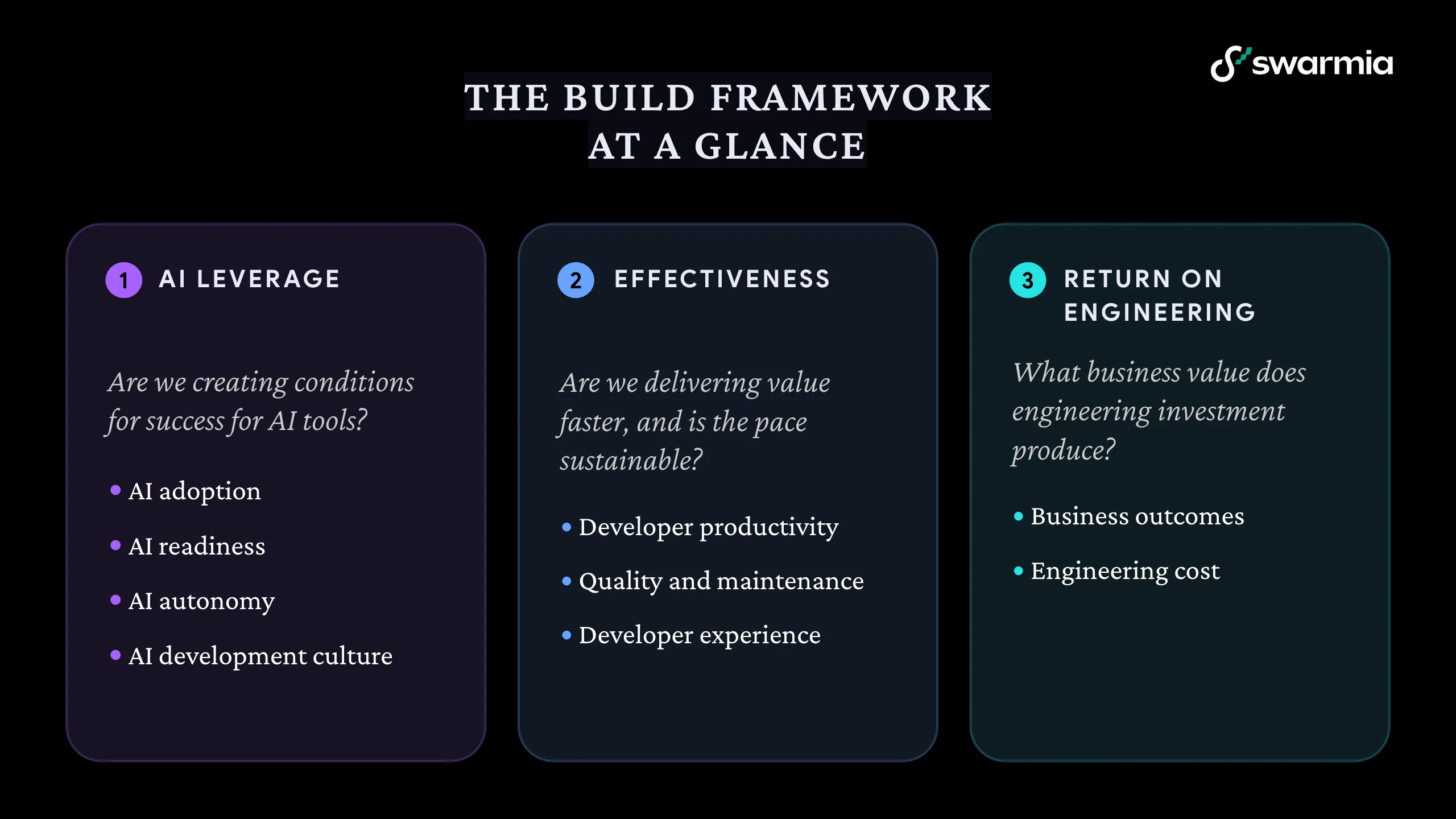
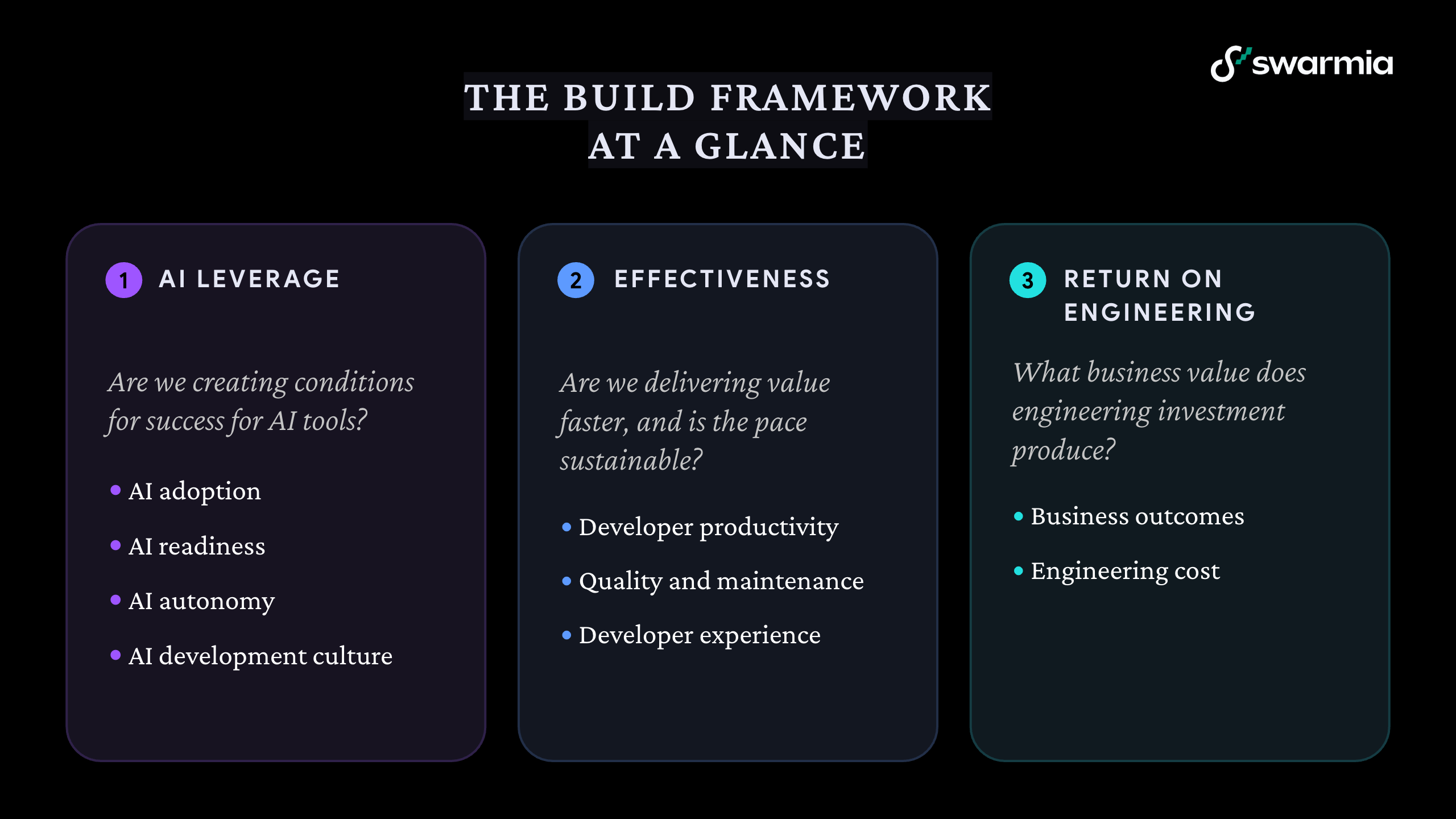
So if you’re reading this, there’s a good chance you’re looking at software engineering intelligence platforms to answer some version of the AI ROI question. That’s a fine place to start, but in our experience the answer depends on a lot more than your AI tools, which is why this guide is structured around the Build framework rather than a list of features. We created the framework from our work with engineering organizations that are changing how they build software with agents, and it has three parts:
- AI leverage: are you creating the conditions for AI to succeed?
- Effectiveness: are you delivering value faster, and is that pace sustainable?
- Return on engineering: what business value does the engineering investment produce, now that AI is part of the bill?
Yes, it’s our framework, and yes, we sell one of these platforms (you’re reading this on our blog, after all). I’ve tried to keep the questions in this guide to ones that any vendor should be able to answer, and you can decide for yourself how well I managed that.
Further down there’s also a section on evaluating your shortlist, some thoughts on ROI that don’t involve a forty-variable spreadsheet, and tips for building your business case. Off we go.
Before you start: what kind of organization do you want to build?
I’d figure this out before you sit through a single demo, because the platform you pick will push your organization one way or the other whether you mean it to or not.
You could go down the monitoring route, where individual developers get ranked against each other, metrics mostly show up in performance reviews or cost-cutting conversations, and teams feel watched rather than supported. AI has given this approach a fresh coat of paint, too. A leaderboard of who uses the most tokens or has the highest share of AI-assisted PRs looks very modern, and tells you roughly as much about someone’s contribution as lines of code ever did (people will also work out how to top it within about a week).
Or you could go with an approach built on trust and continuous improvement, where teams use data to find and fix their own bottlenecks, metrics are about teams and the system rather than individuals, and leadership gets visibility without micromanaging. Being nice to developers is a pleasant side effect, sure, and the bottlenecks AI exposes — review queues, slow CI, decisions that take longer than the building — are almost all system problems anyway, so you won’t find them by staring harder at individuals.
The rest of this guide assumes you’re going with the second one.
Part 1: AI leverage
Most people expect an AI-era buyer’s guide to start here, so here we are. For a while, counting licenses was more or less the whole conversation, but once most of your engineers are using AI tools every week, another percentage point of adoption doesn’t tell you much. What you want to know by then is whether your organization gives AI what it needs to do good work, and whether more of the work is going to AI over time.
AI adoption
You still need the basics, and you need them per tool, because every new tool and model has its own adoption curve and you’re probably paying for more than one. A platform should show you who has a license, who’s using it daily or weekly, and how much of your completed work AI contributed to. Usage stats pulled from each AI vendor’s admin panel tell you someone opened the tool, but not whether anything they made with it got merged.
The most basic use of this data is also the most satisfying one: if people aren’t using the licenses you pay for, you stop paying for them. Our AI adoption and cost module exists partly for exactly that reason.
AI readiness
Agents are only as good as the system they’re working in. If your CI takes 40 minutes and fails randomly one run in five, that used to annoy your engineers, and now it also slows down every single agent iteration. If your repositories have no AGENTS.md or CLAUDE.md files, the agents are guessing how your codebase works, and guessing is expensive.
So look for a platform that shows you CI pipeline health (build times, failure rates, flaky tests) and, ideally, how well your repositories are set up for agents. Nobody tends to look at this stuff until something forces them to, and by then the agents have been waiting on a flaky test suite for months.
AI autonomy
As trust in agents grows, more work gets handed to them entirely. In the top decile of Swarmia customers, autonomous agents authored 12% of merged PRs in Q2 2026, compared with 3.9% in the top quartile, so there’s a big spread here even among organizations that are doing well.
To see any of this, a platform has to be able to tell agent-authored work apart from human work in the first place, and that’s a good early question for vendors, because not all of them can. After that, you want to know whether the work being delegated is getting harder over time or whether agents are still mostly fixing typos and bumping dependencies, and where delegated work gets abandoned or rewritten by a human.
AI development culture
You can’t buy this one, and I’d be suspicious of any vendor who says otherwise. The biggest gains we’ve seen come from organizations that changed how they work around the tools — prototyping before they prioritize, handing engineers problems instead of specs, building in small groups rather than handing work down a line. The framework page has more on what that looks like in practice.
A platform can give you signals here, like whether the time from idea to merged code is getting shorter, or whether non-developers are starting to contribute changes, and developer surveys can tell you a lot about how people feel the way of working is changing. But it can’t change the culture for you.
Questions to ask vendors about AI leverage
- Which AI tools do you integrate with today, and how quickly did you add the last new one?
- Can you show AI-assisted and agent-authored work separately from human work, at the level of individual pull requests?
- Do you show license usage and actual contribution to merged work, or only one of those?
- Can I see CI health and repository readiness for agents alongside AI adoption?
Part 2: Effectiveness
I’d encourage you not to skip this part, even though it’s the least exciting thing to bring up when everyone else is talking about building a lights-out software factory. While AI makes individuals and even whole teams faster at producing code, it doesn’t make an organization better at delivering software on its own. The code gets written faster and then waits somewhere else: in review, in a deployment queue, in a planning meeting.
The things that made engineering organizations effective before still apply: appropriately sized tasks, fast feedback, not too much work in progress at once, and teams that can improve how they work without asking permission. The engineering fundamentals didn’t go anywhere, if anything they’re being put to the test now that the volume of code has gone up.
Developer productivity
You still want the classics here. DORA metrics (deployment frequency, change lead time, change failure rate, and mean time to recovery), cycle time, and flow efficiency all belong on your list. But AI has made some of them trickier to read, and a good platform should help you with that rather than give you a nicer chart of a misleading number.
Throughput is the obvious one. Raw PR counts inflate as AI usage grows, so a platform should let you look at coding throughput alongside issue throughput, which is much closer to whether more work is getting done. Batch size is another: AI tends to produce bigger pull requests, and bigger pull requests take longer to review all on their own, which makes any simple before-and-after comparison of cycle time pretty unreliable unless you account for it.
Then there’s code review, which is usually the first place the extra volume piles up. Look for time to first review, review load per engineer, and how much review is AI-assisted (88% of merged PRs in the top decile of our customers had AI-assisted review in Q2 2026). AI review helps, but it’s not a replacement for people reviewing each other’s code, which is still how engineers learn and how knowledge about the codebase gets around.
And whatever the metric, it should be at the team level, explorable all the way down to the pull requests behind it, and focused on the system, not on who did what. If a platform’s headline feature is ranking individual developers, that’s your cue to politely end the call.
Quality and maintenance
This one gets underestimated a lot, so it gets its own heading. One of our customers explained it with some simple maths: if you used to deploy 100 times a week and have one incident, and now you’re deploying 1,000 times a week at the same quality, you now have… ten incidents. Each one needs the same human attention as before, and it’s the same people handling them.
So you want to see how much engineering time goes to maintenance, firefighting, and rework compared with new work, measured in engineering effort (not ticket counts), along with bug backlog, incidents, and change failure rate. If AI is creating capacity, it should show up as more time going to new work. If that ratio starts bending back toward maintenance a few months after a big shipping push, you probably know why.
Developer experience
Developer experience used to get treated as a nice-to-have for once the “real” problems were solved, which never made much sense and makes even less now. Engineers are dealing with more code than ever, more actors in the system (agents, and increasingly non-developers making changes too), and tooling that changes every few months. That’s a lot of cognitive load, and it doesn’t show up in delivery metrics until people start leaving.
Look for developer experience surveys with specific questions about things like build times, review, focus time, and how much friction there is in getting code to production. A generic satisfaction score once a year won’t tell you much. The survey results should sit next to your engineering metrics so you can compare what people say with what the data says.
Also check how well the platform fits into the places developers already work. Things like Slack notifications about pull requests that need attention, and working agreements that teams set for themselves, are how a platform gets teams fixing things themselves. Developers should be able to see their own data, too, and understand how it feeds into team numbers.
Questions to ask vendors about effectiveness
- How do you handle bigger batch sizes and AI-inflated PR counts when comparing throughput or cycle time over time?
- Can I drill down from any number to the pull requests, issues, and deployments behind it?
- How do you measure the share of effort going to maintenance and rework, and how is that effort calculated?
- What do engineers get out of the platform day to day, and what’s your typical engagement among developers (not just managers)?
Part 3: Return on engineering
The AI ROI question from the start of this guide belongs here, although it turns out to be one part of a bigger question. AI spend is big enough now that nobody can ignore it, but shipping a lot more doesn’t count for much if it isn’t going toward what the business needs. So return on engineering covers two things: whether engineering effort is going to the right places, and what it costs to get there.
Business outcomes
This is about connecting engineering work to company priorities without making engineers fill in timesheets or managers write status reports every Friday.
You want investment balance that shows how effort splits between new features, improvements, productivity work, and keeping the lights on, by team and across the whole organization. Can you see that one team spends 70% of its time on maintenance while another is almost entirely on new work? Can you check whether the goal you set in January to reduce technical debt is happening, or just being talked about?
You’ll also want initiative tracking across teams, based on the development work itself (so nobody has to update status fields by hand). That way you can see how much of what engineering does links to a stated priority, whether initiatives are making steady progress, and whether they’re finishing when you said they would.
Engineering cost
This is the newer half, and the one to push vendors hardest on. To answer whether AI is paying off, you need to see headcount cost and AI cost together — licenses and model usage — and then what that combined cost buys you, per pull request or per story. Cost per unit of work is a useful number because it’s comparable over time and it makes the outliers easy to spot: the PRs or stories whose cost is way out of line with how complex they were, or the repositories where agents burn through tokens because nobody wrote them any instructions.
The same effort data is what you need for software capitalization. If your finance team needs capex reports, the platform should produce them from the work itself, without timesheets, and to a standard your auditors will accept. Ask vendors how their effort model is validated. (Ours is validated at around 95% accuracy, and the capitalization reports are SOC 1 audited.)
And because leadership questions are never quite the questions any vendor built a chart for, check how easy it is to ask your own. In Swarmia that’s Explore for building custom reports, Swarmia AI for asking questions about your engineering data in plain language, and an MCP server for asking them from Claude or Cursor instead.
Questions to ask vendors about return on engineering
- Can you show headcount and AI cost together, and break that down to cost per pull request or story?
- How is developer effort calculated, and how has that model been validated?
- Will your capitalization reports pass an audit, and has that been tested?
- When I have a question your standard reports don’t answer, how do I get the answer?
Evaluating your shortlist
Comparing vendors is trickier than it sounds. Demo environments are polished, reference customers are handpicked, and every vendor will tell you their platform solves exactly your problems (I’m aware of the irony of saying this on a vendor’s blog). Meanwhile, you’re making a decision that will affect your organization for years, and the money is honestly the smaller part of that compared with the trust you build or lose with your teams by rolling out a tool they either find useful or resent.
Everything in the three parts above depends on the platform getting your data right, and that’s harder than it used to be. Your work now runs through GitHub or GitLab, one or two issue trackers, CI, a handful of AI coding tools, one or more agents, and an HR system that’s the only place that knows who’s on which team. A platform needs to pull all of that into one model of your organization and keep it correct when teams split, repositories get archived, and someone creates a new Jira project without telling anyone.
We’ve seen teams pick tools with impressive demos and complex metrics, only to find out later that the numbers don’t match what’s happening in their organization. Once people stop trusting the numbers, it’s very hard to win them back, and the platform turns into very expensive shelfware.
So test it with your own data if you can. Leaders want to be able to trace any number back to the work behind it when someone questions it in a leadership meeting. For managers it’s more about whether cycle times match what they’ve seen with their own eyes, and whether a big one-off migration can be excluded before it wrecks a whole quarter of metrics. Engineers will spot fast if their work is missing or credited to the wrong team, and finance needs effort and capitalization numbers it can explain line by line.
Insights you can do something with
Pretty much every platform will collect your data and draw you some charts. Without something telling you what to do about them, though, even a very nice dashboard ends up as digital wallpaper.
Look for platforms that flag problems without anyone having to go looking: review queues building up, work-in-progress creeping over a team’s limits, an initiative that’s stalled. Check whether insights reach people where they already work, like Slack or Teams, at a point where they can still do something about it. And when the platform tells you cycle time is high, does it tell you why?
Implementation and time to value
We’ll have you up and running in a few days.
Every vendor says this (yes, including us), so it’s good to find out what it means for you. Some platforms need extensive data cleanup, configuration, training, and even changes to your workflows before you can trust what you’re seeing. Others work with your existing workflows from day one.
Ask how long it takes before you’d be comfortable showing the data to other executives, whether the platform requires extensive process changes to be useful, how much configuration managers can do themselves without opening a support ticket, and whether your platform team will need to maintain anything.
Everyone who has to use it
A platform should be useful to everyone who touches it. When engineers find it useful, adoption goes up and data quality improves with it. When managers get insights that help with coaching and retros, teams get better. When product managers can see realistic delivery timelines, planning improves. When leadership gets the visibility they need, everyone has fewer status meetings. You get the picture.
If a platform is clearly built for one of these groups and tolerated by the others, you’ll feel that six months in.
Keeping up
Think about where your organization will be in a couple of years. Can the platform handle growing team sizes and reorganizations? How does pricing scale, and what’s included per seat — some vendors include customer success and change management support, others charge for it separately. Will someone from the vendor help you keep your data in good shape as you grow, or are you on your own after onboarding?
And with AI specifically: the tools you use today won’t be the tools you use in a year. Ask how quickly the vendor added support for the last few AI tools and agents that came out, because you’ll need them to keep doing that.
What about building it yourself?
These days this is a real option. Someone on your team can get a working dashboard out of Claude Code over a weekend, and honestly, it might even look good. Whether that’s a better idea than buying depends on what happens after the weekend — the maintenance, the data mapping, the methodology, and the attention it takes from your team — which is a whole article of its own, so we wrote one: should you build or buy a software engineering intelligence platform?
We could create an elaborate formula with dozens of variables and impressive-looking multipliers, or we could keep it simple. We’re going with simple.
Swarmia’s Standard plan costs $45 per developer per month, billed annually. Now put that next to what you’re spending per developer on AI tools, licenses plus usage. For a lot of organizations the AI number is already the bigger one, and growing. Spending a fraction of that to find out whether the rest is working is a fairly easy argument to make.
Beyond that, the value comes from a few places:
- Friction you can see and remove. Even modest inefficiencies add up: 5% of time waiting for code reviews, 5% in unnecessary meetings, and 3% fighting flaky tests means 13% of developer time lost. For a developer costing $150k a year, that’s nearly $20k per person, and slow CI and review queues now slow down your agents as well as your engineers.
- AI spend that goes to the right places. Cutting unused licenses comes first, and then there’s finding where AI use isn’t appropriate for the task, like expensive models on simple work or agents that burn tokens in repositories without instructions (which tends to add up to a lot more).
- Keeping people. Replacing a developer is often said to cost 50–200% of their annual salary once you factor in recruiting, onboarding, and lost productivity. If better visibility into developer experience helps you keep one engineer a year who would otherwise have left, that’s potentially six figures, plus their knowledge of your systems.
- Leadership time. How many hours do your engineering leaders spend putting together status reports and figuring out what’s going on across teams? With the right data, a good chunk of that goes back to leadership work.
- Financial reporting. Automated capitalization reporting saves hundreds of hours a year for many organizations, and it’s more accurate than reconstructing time from memory at quarter end.
Then there are the things that are harder to put a number on but that everyone knows are real. Getting features to customers a week earlier can win you a deal you’d otherwise have lost. Happier developers do better work, stay longer, and recruit their friends. Fewer incidents mean fewer late nights and fewer angry customers. And leadership making decisions about hiring, priorities, and AI budgets based on what’s happening rather than what it feels like is happening is pretty much the point of all this.
Building your business case
Even the best platform will fail without organizational buy-in. Engineers need to trust it, managers need to want it, and someone senior needs to back it.
Executives mostly want to hear about outcomes, so quantify what the current inefficiencies cost and position this as an investment in how the organization builds software, and not one more tool purchase. In leadership speak, “we’ll know which of our AI spend is paying off, and deliver the roadmap faster” sounds a lot better than “we’ll reduce cycle time by 30%.”
Your business case should balance the numbers with the less quantifiable benefits: the current cost of inefficiency, the AI spend you can’t yet account for, expected gains, and the platform cost compared with the alternatives (including building it yourself). If you can, tell a story — start with the pain everyone already feels, show a believable path to improvement, and be honest about what it will take.
Phew
That was… a lot. You’ve gone from figuring out what kind of organization you want to build, through all three parts of the Build framework, to evaluating vendors and convincing the people who sign off on the budget.
Whichever platform you choose, the AI question that probably got you here is a good one to keep asking, but I’d hope it ends up being one of several. The organizations getting the most out of AI right now can see their whole system — what AI is doing in it, where the work gets stuck, and what it’s all costing — and keep changing how they work as the tools change underneath them, and license utilization is a fairly small part of that. A platform should help you do that, and if it only tells you how many people opened Copilot this week, keep looking.
Want some help?
Our friendly sales team is ready to show you around Swarmia and help you build a business case tailored to your organization.
Book a demo



'%20stroke='url(%23paint1_linear_110_4764)'%20stroke-width='0.5'/%3e%3cdefs%3e%3clinearGradient%20id='paint0_linear_110_4764'%20x1='19.651'%20y1='5.88916'%20x2='19.651'%20y2='27.8676'%20gradientUnits='userSpaceOnUse'%3e%3cstop%20offset='0.1'%20stop-color='%235549C2'/%3e%3cstop%20offset='0.9'%20stop-color='%2370C9E4'/%3e%3c/linearGradient%3e%3clinearGradient%20id='paint1_linear_110_4764'%20x1='19.651'%20y1='5.88916'%20x2='19.651'%20y2='27.8676'%20gradientUnits='userSpaceOnUse'%3e%3cstop%20stop-color='%234D3DDD'/%3e%3cstop%20offset='0.322115'%20stop-color='%2364CDED'/%3e%3cstop%20offset='0.5'%20stop-color='%23736CFF'/%3e%3cstop%20offset='0.75'%20stop-color='%2364CDED'/%3e%3cstop%20offset='1'%20stop-color='%234D3DDD'/%3e%3c/linearGradient%3e%3c/defs%3e%3c/svg%3e)


'%20stroke='url(%23paint1_linear_110_4820)'%20stroke-width='0.5'/%3e%3cdefs%3e%3clinearGradient%20id='paint0_linear_110_4820'%20x1='20.0002'%20y1='4.11661'%20x2='20.0002'%20y2='33.8832'%20gradientUnits='userSpaceOnUse'%3e%3cstop%20offset='0.1'%20stop-color='%235549C2'/%3e%3cstop%20offset='0.9'%20stop-color='%2370C9E4'/%3e%3c/linearGradient%3e%3clinearGradient%20id='paint1_linear_110_4820'%20x1='20.0002'%20y1='4.11661'%20x2='20.0002'%20y2='33.8832'%20gradientUnits='userSpaceOnUse'%3e%3cstop%20stop-color='%234D3DDD'/%3e%3cstop%20offset='0.322115'%20stop-color='%2364CDED'/%3e%3cstop%20offset='0.5'%20stop-color='%23736CFF'/%3e%3cstop%20offset='0.75'%20stop-color='%2364CDED'/%3e%3cstop%20offset='1'%20stop-color='%234D3DDD'/%3e%3c/linearGradient%3e%3c/defs%3e%3c/svg%3e)

'%3e%3cpath%20d='M12.9414%2023.0626C12.6251%2023.0626%2012.3687%2023.319%2012.3687%2023.6354L12.3687%2025.1077C12.3687%2025.424%2012.6251%2025.6805%2012.9414%2025.6805H12.9868C14.4524%2025.6805%2016.6386%2025.6805%2018.1041%2025.6805H18.1622C18.4785%2025.6805%2018.735%2025.424%2018.735%2025.1077L18.735%2023.6354C18.735%2023.319%2018.4785%2023.0626%2018.1622%2023.0626H12.9414Z'%20fill='%23899FCF'/%3e%3cpath%20d='M18.7514%2020.8724C18.7514%2020.0855%2019.1849%2019.3779%2019.764%2018.8452C21.016%2017.6937%2021.8005%2016.0418%2021.8005%2014.2067C21.8005%2010.727%2018.9796%207.90607%2015.4999%207.90607C12.0202%207.90607%209.19928%2010.727%209.19928%2014.2067C9.19928%2016.0435%209.9853%2017.6968%2011.2393%2018.8484C11.8181%2019.3799%2012.2511%2020.0866%2012.2511%2020.8724C12.2511%2021.1887%2012.5076%2021.4452%2012.8239%2021.4452H18.1786C18.495%2021.4452%2018.7514%2021.1887%2018.7514%2020.8724Z'%20fill='%23899FCF'/%3e%3c/g%3e%3cdefs%3e%3cclipPath%20id='clip0_111_18741'%3e%3crect%20width='19'%20height='19'%20fill='white'%20transform='translate(6%207.29321)'/%3e%3c/clipPath%3e%3c/defs%3e%3c/svg%3e)

'%3e%3cpath%20fill-rule='evenodd'%20clip-rule='evenodd'%20d='M24.0701%207.72604L20.7065%207.72604C20.3309%207.72604%2020.0265%208.03047%2020.0265%208.40599L20.0265%2011.7696C20.0265%2011.9911%2020.1324%2012.1879%2020.2964%2012.312L18.6479%2015.609L17.4892%2015.609L17.4944%2015.6038C16.454%2015.6038%2016.3965%2014.6207%2016.3934%2014.5122L16.3934%2012.3475C16.3934%2011.972%2016.089%2011.6676%2015.7134%2011.6676L12.3498%2011.6676C11.9743%2011.6676%2011.6699%2011.972%2011.6699%2012.3475L11.6699%2015.7111C11.6699%2015.748%2011.6728%2015.7842%2011.6785%2015.8195L9.81296%2019.5505L7.92995%2019.5505C7.55442%2019.5505%207.25%2019.8549%207.25%2020.2305L7.25%2023.594C7.25%2023.9696%207.55442%2024.274%207.92995%2024.274L11.2935%2024.274C11.6691%2024.274%2011.9735%2023.9696%2011.9735%2023.594L11.9735%2020.2305C11.9735%2020.0089%2011.8675%2019.8121%2011.7035%2019.688L13.352%2016.3911L14.6282%2016.3911C15.5514%2016.4636%2015.6058%2017.3707%2015.609%2017.4775L15.609%2019.6526C15.609%2020.0281%2015.9135%2020.3325%2016.289%2020.3325L19.6526%2020.3325C20.0281%2020.3325%2020.3325%2020.0281%2020.3325%2019.6526L20.3325%2016.289C20.3325%2016.2508%2020.3294%2016.2133%2020.3233%2016.1768L22.187%2012.4495L24.0701%2012.4495C24.4456%2012.4495%2024.75%2012.1451%2024.75%2011.7696L24.75%208.40599C24.75%208.03047%2024.4456%207.72604%2024.0701%207.72604Z'%20fill='%23899FCF'/%3e%3c/g%3e%3cdefs%3e%3cclipPath%20id='clip0_2772_12454'%3e%3crect%20width='20'%20height='20'%20fill='white'%20transform='translate(6%206)'/%3e%3c/clipPath%3e%3c/defs%3e%3c/svg%3e)


'%3e%3cpath%20d='M14.5615%2031.9046H25.9297C26.5036%2031.9046%2026.9697%2032.3701%2026.9697%2032.9437V35.7552L26.9639%2035.8616C26.9104%2036.3852%2026.4676%2036.7933%2025.9297%2036.7933H25.8037C25.1902%2036.7934%2024.6569%2037.0835%2024.1855%2037.4368C23.9487%2037.6144%2023.7206%2037.8125%2023.5029%2038.0062C23.2832%2038.2016%2023.0755%2038.3909%2022.8682%2038.5589C22.5182%2038.8424%2022.0724%2039.012%2021.5869%2039.012H18.8779C18.3922%2039.012%2017.9456%2038.8424%2017.5957%2038.5589C17.3883%2038.3909%2017.1806%2038.2016%2016.9609%2038.0062C16.7434%2037.8126%2016.516%2037.6143%2016.2793%2037.4368C15.8668%2037.1275%2015.4065%2036.8672%2014.8867%2036.8069L14.6611%2036.7933H14.5615C13.9879%2036.7931%2013.5235%2036.3288%2013.5234%2035.7552V32.9437C13.5235%2032.3701%2013.9878%2031.9047%2014.5615%2031.9046ZM20.3848%200.98761C27.847%200.98761%2033.8963%207.03716%2033.8965%2014.4993C33.8965%2018.4346%2032.2143%2021.9769%2029.5293%2024.4466C28.2431%2025.6297%2027.258%2027.2224%2027.2578%2029.014V29.015C27.2575%2029.5885%2026.7914%2030.054%2026.2178%2030.054H14.5586C13.985%2030.054%2013.5188%2029.5885%2013.5186%2029.015V29.014C13.5183%2027.2247%2012.5334%2025.6349%2011.248%2024.4544C8.55856%2021.9844%206.87305%2018.4383%206.87305%2014.4993C6.8732%207.03726%2012.9227%200.987767%2020.3848%200.98761ZM20.0518%2018.6585C19.6614%2018.6587%2019.3447%2018.976%2019.3447%2019.3665V26.6859C19.345%2027.0761%2019.6615%2027.3927%2020.0518%2027.3929H20.7178C21.1082%2027.3929%2021.4245%2027.0762%2021.4248%2026.6859V19.3665C21.4248%2018.9759%2021.1084%2018.6585%2020.7178%2018.6585H20.0518Z'%20fill='url(%23paint0_linear_166_518)'%20stroke='url(%23paint1_linear_166_518)'%20stroke-width='0.416667'/%3e%3c/g%3e%3cdefs%3e%3clinearGradient%20id='paint0_linear_166_518'%20x1='20.3849'%20y1='0.779602'%20x2='20.3849'%20y2='39.2204'%20gradientUnits='userSpaceOnUse'%3e%3cstop%20offset='0.1'%20stop-color='%235549C2'/%3e%3cstop%20offset='0.9'%20stop-color='%2370C9E4'/%3e%3c/linearGradient%3e%3clinearGradient%20id='paint1_linear_166_518'%20x1='20.3849'%20y1='0.779602'%20x2='20.3849'%20y2='39.2204'%20gradientUnits='userSpaceOnUse'%3e%3cstop%20stop-color='%234D3DDD'/%3e%3cstop%20offset='0.322115'%20stop-color='%2364CDED'/%3e%3cstop%20offset='0.5'%20stop-color='%23736CFF'/%3e%3cstop%20offset='0.75'%20stop-color='%2364CDED'/%3e%3cstop%20offset='1'%20stop-color='%234D3DDD'/%3e%3c/linearGradient%3e%3cclipPath%20id='clip0_166_518'%3e%3crect%20width='40'%20height='40'%20fill='white'/%3e%3c/clipPath%3e%3c/defs%3e%3c/svg%3e)


'%3e%3cpath%20d='M31.01%204.32568C29.1716%207.09907%2027.894%209.22748%2027.1194%2010.8218C26.607%2011.8752%2026.3824%2012.5664%2026.2971%2013.019C26.2127%2013.467%2026.2606%2013.7057%2026.3293%2013.8325V13.8335L26.3323%2013.8384C26.3498%2013.8686%2026.3918%2013.9371%2026.4934%2013.9897C26.5848%2014.0371%2026.7072%2014.0629%2026.8733%2014.063C27.2288%2014.063%2027.6883%2013.9506%2028.2385%2013.7456C28.7927%2013.5391%2029.4565%2013.2322%2030.2258%2012.8267C31.7308%2012.0333%2033.655%2010.8562%2035.9875%209.3042L36.3762%209.79346C34.0139%2012.0094%2032.1768%2013.8719%2030.9241%2015.5464C29.6466%2017.2539%2028.9592%2018.7892%2028.9592%2020.3247V20.5327H28.9709C29.0302%2021.999%2029.7102%2023.4718%2030.9299%2025.1021C32.1828%2026.7767%2034.0204%2028.6388%2036.3831%2030.855L35.9924%2031.3442C33.66%2029.7923%2031.7356%2028.6151%2030.2307%2027.8218C29.4616%2027.4163%2028.7984%2027.1093%2028.2444%2026.9028C27.6942%2026.6978%2027.2346%2026.5854%2026.8792%2026.5854C26.7132%2026.5855%2026.5907%2026.6114%2026.4993%2026.6587C26.3975%2026.7114%2026.3556%2026.7809%2026.3381%2026.811L26.3352%2026.8149C26.2662%2026.9414%2026.2184%2027.179%2026.303%2027.6274C26.3883%2028.0793%2026.6129%2028.7705%2027.1252%2029.8267C27.8998%2031.4207%2029.1724%2033.5483%2031.0159%2036.3218L30.5256%2036.7114C28.3119%2034.3499%2026.4515%2032.5118%2024.7776%2031.2583C23.0705%2029.98%2021.5349%2029.2915%2019.9983%2029.2915C18.4617%2029.2915%2016.9261%2029.98%2015.219%2031.2583C13.545%2032.5119%2011.6839%2034.3496%209.46997%2036.7114L8.97974%2036.3218C10.818%2033.5485%2012.0967%2031.4209%2012.8713%2029.8267C13.3835%2028.7736%2013.6082%2028.083%2013.6936%2027.6304C13.7782%2027.1812%2013.7304%2026.9415%2013.6614%2026.8149L13.6584%2026.811L13.6096%2026.7437C13.5843%2026.716%2013.5483%2026.6851%2013.4973%2026.6587C13.4059%2026.6114%2013.2834%2026.5855%2013.1174%2026.5854C12.7619%2026.5854%2012.303%2026.6978%2011.7532%2026.9028C11.1995%2027.1093%2010.5367%2027.4163%209.76782%2027.8218C8.26358%2028.6151%206.33836%2029.7912%204.00317%2031.3433L3.61841%2030.855C5.98121%2028.6386%207.81958%2026.7767%209.07251%2025.1021C10.3498%2023.3947%2011.0372%2021.86%2011.0374%2020.3247C11.0374%2018.7892%2010.35%2017.2539%209.07251%2015.5464C7.81948%2013.8716%205.9815%2012.0091%203.61841%209.79248L4.00317%209.3042C6.33861%2010.8564%208.26347%2012.0333%209.76782%2012.8267C10.5367%2013.2322%2011.1995%2013.5391%2011.7532%2013.7456C12.303%2013.9506%2012.7619%2014.063%2013.1174%2014.063C13.2835%2014.063%2013.4059%2014.037%2013.4973%2013.9897C13.5988%2013.9372%2013.6409%2013.8687%2013.6584%2013.8384L13.6614%2013.8335C13.7304%2013.707%2013.7783%2013.4696%2013.6936%2013.021C13.6083%2012.5691%2013.3837%2011.8779%2012.8713%2010.8218H12.8704C12.0956%209.22166%2010.8232%207.09888%208.97974%204.32568L9.46997%203.93701C11.6838%206.29874%2013.5434%208.13651%2015.2161%209.39014C16.9217%2010.6684%2018.4559%2011.3578%2019.9924%2011.3579C21.529%2011.3579%2023.0646%2010.6685%2024.7717%209.39014C26.4457%208.13661%2028.3061%206.29858%2030.5198%203.93701L31.01%204.32568Z'%20fill='url(%23paint0_linear_166_603)'%20stroke='url(%23paint1_linear_166_603)'%20stroke-width='0.416667'/%3e%3c/g%3e%3cdefs%3e%3clinearGradient%20id='paint0_linear_166_603'%20x1='20.001'%20y1='3.65479'%20x2='20.001'%20y2='36.9939'%20gradientUnits='userSpaceOnUse'%3e%3cstop%20offset='0.1'%20stop-color='%235549C2'/%3e%3cstop%20offset='0.9'%20stop-color='%2370C9E4'/%3e%3c/linearGradient%3e%3clinearGradient%20id='paint1_linear_166_603'%20x1='20.001'%20y1='3.65479'%20x2='20.001'%20y2='36.9939'%20gradientUnits='userSpaceOnUse'%3e%3cstop%20stop-color='%234D3DDD'/%3e%3cstop%20offset='0.322115'%20stop-color='%2364CDED'/%3e%3cstop%20offset='0.5'%20stop-color='%23736CFF'/%3e%3cstop%20offset='0.75'%20stop-color='%2364CDED'/%3e%3cstop%20offset='1'%20stop-color='%234D3DDD'/%3e%3c/linearGradient%3e%3cclipPath%20id='clip0_166_603'%3e%3crect%20width='33.3333'%20height='33.3333'%20fill='white'%20transform='translate(3.33167%203.65479)'/%3e%3c/clipPath%3e%3c/defs%3e%3c/svg%3e)




'%20fill='white'/%3e%3cpath%20d='M7.19995%2021.6808C7.19995%2020.3553%208.27447%2019.2808%209.59995%2019.2808H38.3999C39.7254%2019.2808%2040.7999%2020.3553%2040.7999%2021.6808V36.0808C40.7999%2037.4062%2039.7254%2038.4808%2038.4%2038.4808H9.59995C8.27447%2038.4808%207.19995%2037.4062%207.19995%2036.0808V21.6808Z'%20fill='%230A328F'/%3e%3cpath%20d='M22.4787%2029.5558L12.0292%2023.407C11.4796%2023.0835%2011.1421%2022.4934%2011.1421%2021.8556V13.8165C11.1421%2012.491%2012.2166%2011.4165%2013.5421%2011.4165H34.4584C35.7838%2011.4165%2036.8584%2012.491%2036.8584%2013.8165V21.8556C36.8584%2022.4934%2036.5209%2023.0835%2035.9712%2023.407L25.5216%2029.5558C24.5826%2030.1084%2023.4178%2030.1084%2022.4787%2029.5558Z'%20fill='%2340D1F1'/%3e%3cpath%20d='M16.8351%2016.5635L31.1649%2016.5635'%20stroke='%230A328F'%20stroke-width='2.4'%20stroke-linecap='round'%20stroke-linejoin='round'/%3e%3cpath%20d='M16.8351%2021.2124L24%2021.1465'%20stroke='%230A328F'%20stroke-width='2.4'%20stroke-linecap='round'%20stroke-linejoin='round'/%3e%3c/svg%3e)

